Financial Q&A — Ask Questions About Your PTO’s Finances
Managing your PTO’s finances shouldn’t require running multiple reports every time you need an answer.
RunPTO’s Financial Q&A lets authorized users ask questions about their organization’s financial records using everyday language.
Want to know how much income your PTO received? Which expenses exceeded their budgets? What your checking account balance is? Or whether a bank reconciliation was recorded?
Simply ask your question, and Financial Q&A retrieves and analyzes the information recorded in RunPTO.
Getting Started
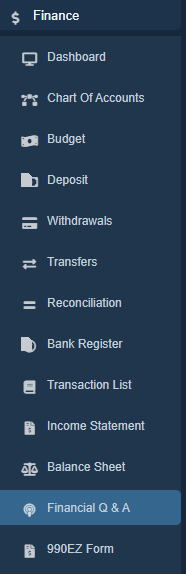
- Navigate to Financial Q&A under Finance.
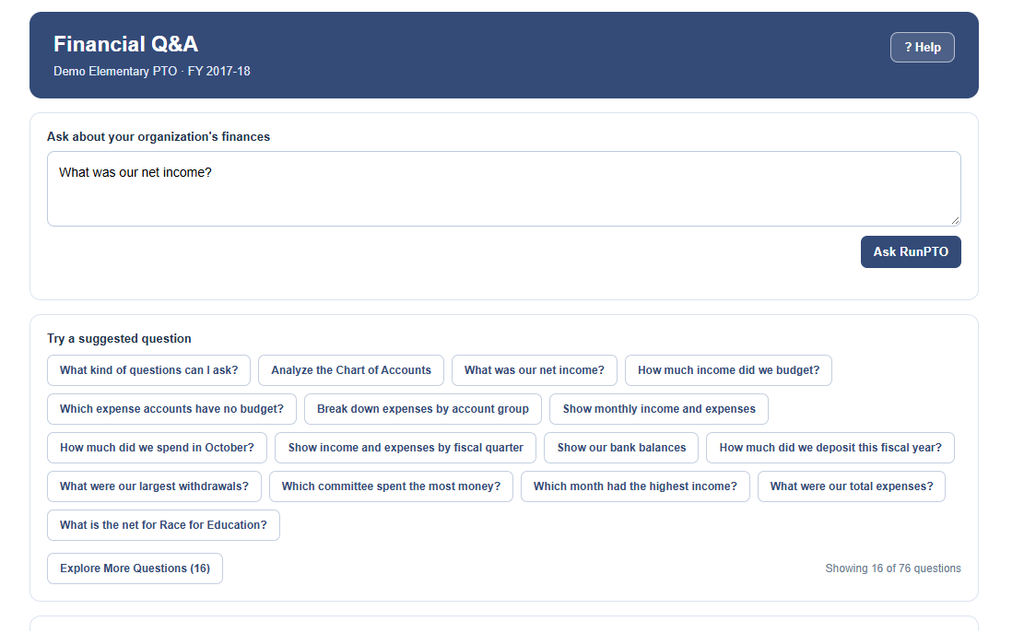
- Type your question into the question box, or select one of the suggested questions (recommended).
- Click Ask RunPTO.
- Review the answer displayed in the conversation area.
You can also click one of the suggested questions to populate the question box.
Explore More Questions: Financial Q&A initially displays 16 suggested questions. Click Explore More Questions to reveal additional examples, 16 at a time.
The suggested questions are examples, not a complete list. You can enter your own questions using natural language but it has to be related to your financials only.
What Can I Ask?
Financial Q&A supports a wide range of questions about your organization’s income, expenses, budgets, accounts, banking activity, and financial trends.
1. Income and Expenses
Find out how much money your organization received, how much it spent, and whether it recorded a surplus or deficit.
Example questions:
- What was our net income?
- How much income did we receive this fiscal year?
- What were our total expenses?
- Which income accounts earned the most?
- Which expense accounts spent the most?
- Show our ten largest expenses.
- What percentage of our income went toward expenses?
- What was our income-to-expense ratio?
- Give me an overview of our income and expenses.
Financial Q&A uses the income and expense transactions recorded in RunPTO for the selected fiscal year.
2. Budget Analysis
Compare actual financial activity with the budgets established for your organization.
Example questions:
- How much income did we budget?
- Show our overall budget performance.
- Which expense accounts exceeded their budgets?
- Which expense accounts have no budget?
- Which income accounts are below their targets?
- Which income accounts exceeded their targets?
- What was our largest expense budget overrun?
- How much expense budget remains?
- What percentage of the expense budget was used?
- How far below budget is our net income?
- Show budget versus actual expenses by group.
Important: An account with no budget record is different from an account with an explicitly recorded budget of $0. Financial Q&A distinguishes between the two.
Some budget calculations cover only accounts with recorded budgets. The answer will identify those limitations where applicable.
3. Chart of Accounts Analysis
Analyze income and expense accounts configured in your organization’s Chart of Accounts.
Example questions:
- Analyze the Chart of Accounts.
- Which income accounts have recorded activity?
- Which expense accounts had no activity?
- Break down expenses by account group.
- Break down income by account group.
- Which income group earned the most?
- Which expense group spent the most?
- How many expense accounts have budgets?
You can also ask about a particular account.
For example:
- What is the net for Race for Education?
- What percentage of income did Membership Dues contribute?
Tip: For account-specific questions, use the account name shown in your organization’s Chart of Accounts. Account names vary between organizations.
When an income and expense account share the same name, Financial Q&A may calculate their combined recorded net amount. This should not automatically be interpreted as the complete profitability of an event.
4. Monthly and Quarterly Financial Trends
Understand when your organization earned income or incurred expenses during the selected fiscal year.
Example questions:
- Show monthly income and expenses.
- How much income did we receive in September?
- How much did we spend in October?
- What was our net income in October?
- Which month had the highest income?
- Which month had the highest expenses?
- Show income and expenses by fiscal quarter.
- What was our income in fiscal Q1?
- What were our expenses in fiscal Q2?
- Which fiscal quarter had the highest income?
RunPTO recognizes fiscal quarters according to the organization’s selected financial year.
For example, if your fiscal year begins July 1:
- Q1: July–September
- Q2: October–December
- Q3: January–March
- Q4: April–June
If your fiscal year begins August 1, the fiscal quarters are adjusted accordingly.
Monthly and quarterly income/expense analysis currently supports organization-wide totals rather than arbitrary account-specific time filters.
5. Compare Financial Years
Compare the organization’s financial performance with the previous fiscal year.
Example questions:
- Compare our income with last year.
- Compare our expenses with last year.
- Compare our net income with last year.
Financial Q&A displays the recorded differences between fiscal years.
Important: If the current fiscal year is still in progress, comparisons may use the current year’s recorded activity against the full previous fiscal year. These comparisons should not be treated as equivalent year-to-date periods.
6. Bank Balances and Activity
Ask questions about the bank accounts configured in RunPTO.
Example questions:
- Show our bank balances.
- How much money do we have in our PNC Checking Account?
- Show a bank activity overview.
- How much did we deposit this fiscal year?
- How much did we withdraw this fiscal year?
- Show bank transfers this fiscal year.
- What were our largest withdrawals?
- What were the opening balances of all bank accounts?
- What was the opening balance of Checking?
Financial Q&A calculates balances using transactions in the RunPTO Bank Register.
The calculations recognize the following transaction types:
| Type | Description |
|---|---|
| A | Opening Balance |
| D | Deposit |
| P | Payment/Withdrawal |
| Q | Transfer In |
| T | Transfer Out |
Important: Bank Register balances reflect transactions recorded in RunPTO. They are not live balances obtained directly from your financial institution.
Deposits are also not necessarily identical to income, and bank withdrawals are not necessarily identical to expenses.
7. Bank Register Balances as of a Date
You can retrieve recorded Bank Register balances through a particular date within the selected fiscal year.
Example questions:
- Show our bank-register balances as of October 31.
- What was the bank register balance of Checking as of October 31?
- What was the bank register balance of PNC Checking Account as of September 30?
Financial Q&A calculates the balance from the relevant Bank Register transactions through the requested date.
These balances include both cleared and uncleared transactions.
The requested date must fall within the selected fiscal year.
8. Bank Reconciliation
Review reconciliation records saved in RunPTO.
Example questions:
- When was each bank account last reconciled?
- Was reconciliation recorded for October?
- What was the last saved reconciliation balance?
- Which bank accounts have no reconciliation records?
Depending on the question and available records, Financial Q&A can report:
- The reconciliation statement date.
- The recorded bank ending balance.
- The calculated account closing balance saved with the reconciliation.
- Whether those balances matched when the reconciliation was saved.
Important: A saved reconciliation record does not necessarily prove that every transaction for that month was cleared. Financial Q&A reports recorded reconciliation information; it does not independently certify the reconciliation.
9. Uncleared Bank Transactions
Identify bank transactions that have not been marked as cleared.
Example questions:
- How many uncleared bank transactions do we have this year?
- Show uncleared bank transactions for this fiscal year.
Financial Q&A can report the number of uncleared transactions and the totals for uncleared deposits, payments, and transfer movements.
It may also display individual uncleared entries.
Note: An uncleared transaction is not necessarily overdue. It simply has not been marked as cleared in RunPTO.
This feature currently analyzes uncleared transactions for the entire selected fiscal year.
10. Committees, Vendors, and Transactions
Analyze spending associated with configured committees, registered vendors, and individual transactions.
Example questions:
- Which committee spent the most money?
- Which vendors received the most payments?
- What were our largest withdrawals?
- What month had the most transactions?
- Show our ten largest expenses.
Committee spending depends on the committee assignments in the Chart of Accounts.
Vendor analysis depends on expense transactions matching configured vendor records.
If no matching records are available, Financial Q&A will indicate that instead of inventing an amount.
How Does Financial Q&A Work?
Financial Q&A uses RunPTO’s financial reporting engine to retrieve information and calculate answers.
Common questions are recognized directly by RunPTO.
For questions phrased in less familiar ways, Financial Q&A may use OpenAI to help interpret what is being requested.
For example, a user might ask:
“Are we spending too much compared to the money we’re bringing in?”
Financial Q&A may interpret that as a request to calculate expenses as a percentage of income.
.
Note your questions need only to be related to the Financial Module.
Understanding Your Answers
Financial Q&A reports information based on your organization’s recorded financial data.
A few important points:
- Selected fiscal year: Most questions use the fiscal year currently selected in RunPTO.
- Bank Register versus Income Statement: Bank deposits and withdrawals are not always the same as recorded income and expenses.
- Budgets: Missing budget records are not automatically considered zero-dollar budgets.
- Account names: Account-specific questions should use the configured Chart of Accounts descriptions.
- Comparisons: Historical comparisons reflect recorded activity and may be affected by changes to the Chart of Accounts.
- Financial assessments: A positive net income does not necessarily mean the organization has that amount available to spend.
Financial Q&A is an informational reporting tool. It does not replace financial review, bank reconciliation, or the judgment of your organization’s treasurer and board.
What If Financial Q&A Cannot Answer My Question?
If a question is not recognized or requests information beyond the currently supported operations, RunPTO may display Question not supported.
Try rewording the question or using one of the suggested examples.
For example, instead of asking:
“How are our finances?”
Try:
“Give me an overview of our income and expenses.”
Or:
“Show our overall budget performance.”
Financial Q&A does not currently support every possible custom date range, all combinations of account filters, or conversational follow-up questions that depend on earlier answers.
Does Financial Q&A Change Any Financial Records?
No. Financial Q&A is a read-only reporting feature.
It does not create, edit, delete, reconcile, or post financial transactions.
It retrieves recorded financial information and presents the results.
Which Financial Information Can I Access?
Financial Q&A uses your authenticated RunPTO organization and selected fiscal year.
The available information is based on the financial records belonging to that organization.
Users must have appropriate access to Financial Q&A through their RunPTO permissions.
Getting the Most Out of Financial Q&A
For the best results:
- Keep your financial transactions up to date.
- Maintain accurate income and expense accounts in your Chart of Accounts.
- Enter annual budgets for accounts you want to compare against budget.
- Keep your Bank Register and reconciliation records current.
- Use specific account names when asking account-level questions.
- Explore the suggested questions to discover additional reporting capabilities.
Financial Answers Made Easier
RunPTO Financial Q&A helps PTO and PTA administrators and treasurers find financial information without having to manually navigate several reports.
Whether you’re preparing for a board meeting, reviewing your annual budget, checking bank activity, or understanding fundraising results, you can start by asking a question.